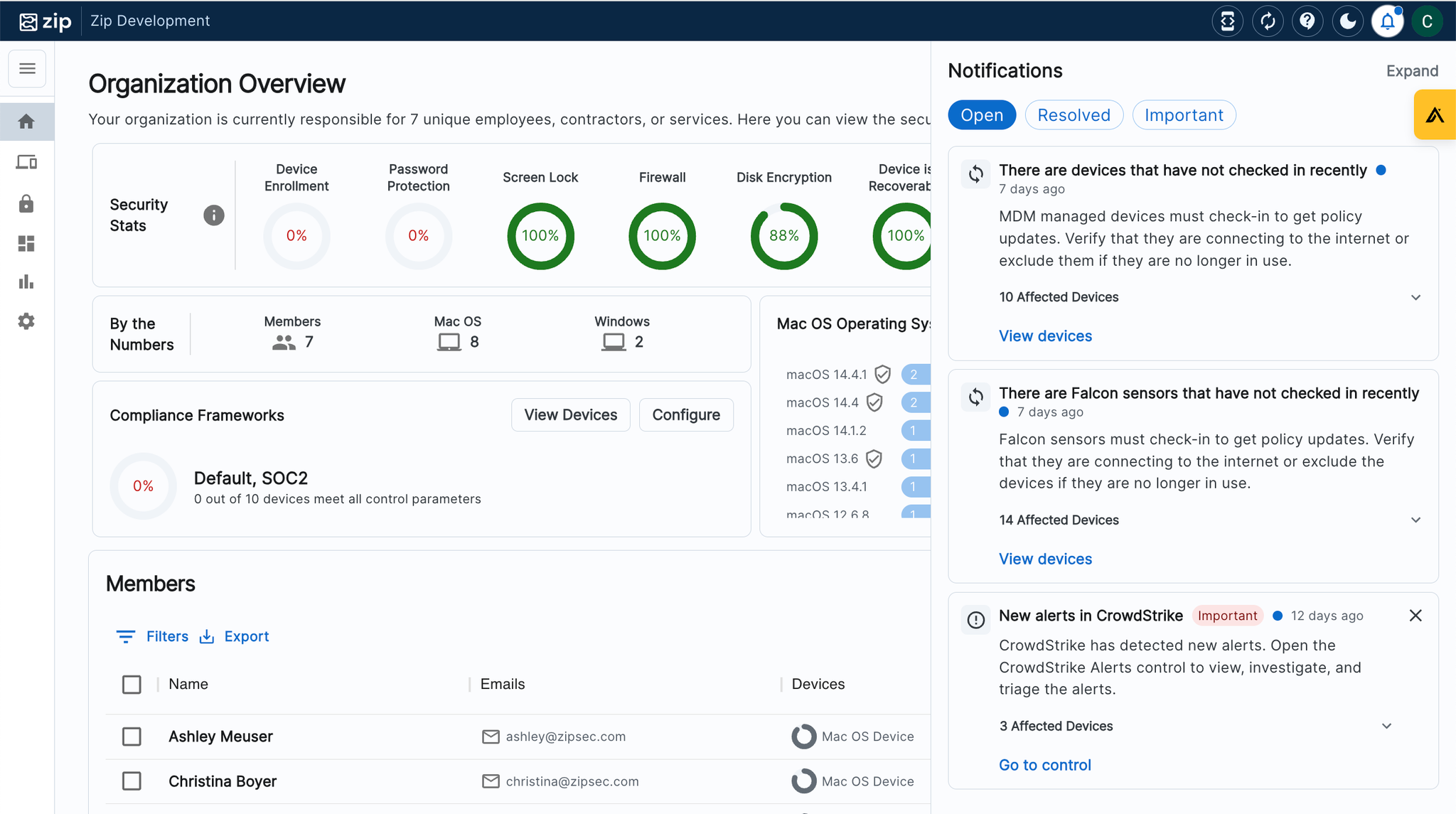
Within the console you will notice that there is a notification center on the righthand sidebar of your console. The notification center helps you manage your Zip console by alerting you to actions and changes in the status of your fleet in a notification panel.
Currently the notification panel reports on:
- New CrowdStrike Alerts
- CrowdStrike Sensor check-ins
- Abnormal activities across devices, including: devices that fall out of management, devices failing to check-in for longer than 24 hours.
- New tasks available in controls
- Achievements - i.e. Controls that recently reached 100% compliance
- Incorrect licensing across Windows devices - i.e. Windows Home vs Pro licenses detected on devices.
- Provider health check warnings
- Windows licenses running low
- New alerts from the Third-Party Applications control
- New alerts from the Manage Chrome Extensions control
Managing Notifications:
- Open the notification panel by navigating the the right hand side of your console and selecting the ‘bell’ icon.
- The ‘open’ tab of the notification center will show all active notifications for your review.
- A prioritization status has been assigned to help users manage notifications, and high priority notifications will be marked with red ‘Important’ tags.
- The open notifications also include summaries of the issues and the ability to click into the issues and take action to resolve them.
- The ‘resolved’ tab shows all historic notifications that have been closed. This will happen automatically when a notification issue has been resolved (and does not require the user to mark the notification as ‘resolved’).
- If you do wish to dismiss a notification, you are able to do this manually by hitting the ‘x’ mark on the righthand side of the notification.
- Note: For high importance notifications, you will not have the functionality to manually dismiss the notification. It will remain ‘open’ until the underlying issue has been addressed. We built this functionality intentionally, as high importance notifications must be addressed for the health of your organization, and should not be ignored!
- The ‘important’ tab shows a view of only the open notifications categorized as ‘high priority’.
Questions? Here’s how to reach us:
- Email: info@zipsecinc.cc