


If you’re a founder, security probably felt manageable early on.
You set up laptops, handled basic device management, chose a few tools, and followed a checklist. For a while, things worked well enough. As your company grew, security management became increasingly complex. You hired more employees, added more devices, and brought in new tools. What once felt under control started to feel fragile.
That’s because proper configuration management—the work of keeping systems set up safely—is often handled manually through security configuration management. It depends on one-time setup, memory, and best intentions. Growth, on the other hand, brings constant change without more time or visibility.
The issue isn’t that founders don’t care about security. It’s that manual enforcement doesn’t hold up in a constantly changing environment.
Setting up your systems securely and making sure they remain that way over time is security configuration management. It’s not about buying more tools or learning complex frameworks. It’s about maintaining the basics that protect your company as it grows, even as you add new cybersecurity tools.
In practical terms, security configuration management includes:
The challenge? These settings rarely fail in an immediately apparent way. When something changes, you don’t always get an alert. Instead, configurations drift quietly as people, devices, and tools evolve.
That’s why companies can believe they’re secure until an audit, a customer question, or an incident exposes gaps they didn’t know were there.
Make visibility a part of your security configuration with Zip. Book a demo here.
Manual security breaks down quickly as companies grow. Their environments become more complex, and there is more to manage. What works with a handful of laptops and a small team becomes much harder to maintain when devices, tools, and responsibilities change every week, and security management takes more time.
In many growing companies, security still depends on manual configuration management, which usually looks like:
This approach isn’t entirely wrong. It’s fragile and labor-intensive, and gaps can introduce serious risk to your company. It’s easy for default settings to slip through during onboarding, updates, or tool rollouts, especially when no one has time to review every change.
As companies scale, deployment risks increase because:
The result is inconsistency across devices and systems, even when the right tools are in place.
Founders end up in a difficult position. They own the security outcome, but they have no idea where they stand. Typically, it’s because they lack a single place to see what’s actually enforced across the company.
When issues surface, it’s rarely because someone ignored security. Configuration drift is a regular part of growing environments, and manual processes can’t keep up.
As companies grow, their approach to security must evolve, particularly if they want to prevent security gaps from becoming actual security breaches.
Most teams focus on security as a setup task. The key question becomes, “Did we configure this?” But setup alone isn’t enough. The more important question is, “Is this still enforced?”
Automated enforcement shifts security from a one-time activity to an ongoing system. It relies on continuous monitoring of system configurations and device management policies, allowing teams to see what is protected, what has changed, and what requires attention. In practice, this means:
A security baseline only matters if it’s maintained. If encryption, patching, or endpoint protection silently stops working, the baseline no longer exists in practice, and the risk of security breaches increases.
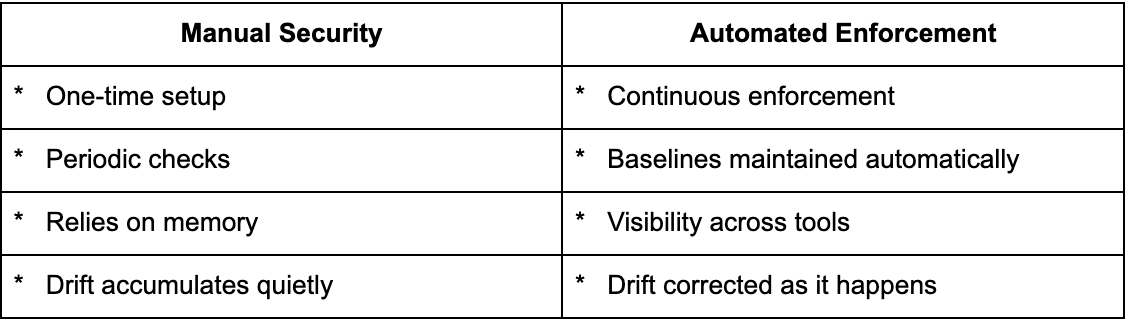
Automation reduces cognitive load for founders and leadership teams. With the right automation tools, security becomes more predictable and less reactive. You no longer have to count on someone to remember what to check.
Automated security configuration management transforms enforcement into a system, rather than a series of manual tasks.
In practice, automated enforcement works by:
For example:
Automated enforcement surfaces these issues and often corrects them before audits, customers, or incidents expose them. Instead of scrambling to prove security after the fact, teams maintain ongoing visibility into what’s actually enforced.
Zip Security allows your business to transition from manual security work to automated enforcement. Our system acts as a control plane that sits above your existing tools, enforcing security across them over time. For founders, this means one place to see what’s protected and what isn’t, and the ability to maintain security baselines, without having to manage settings tool by tool.
But moving from manual security to automation isn’t just about making security easier, it’s also about keeping your company safer. Manual deployment can result in inconsistency across devices, operating systems, and tools, and these gaps can be difficult to spot through manual checks.
Zip helps reduce those risks by:
Zip works with the tools you already rely on, including Jamf, Intune, and endpoint security platforms by bringing them into a single, unified security management system. As your company grows from Series A to Series B, Zip scales with you without requiring additional headcount or constant oversight. Zip gives growing companies confidence that protections stay in place, and as a founder, you don’t have to worry about becoming a security expert to get the job done.
To see how Zip can strengthen your security posture even further, explore Zip’s endpoint security approach and how it stays enforced as your company grows.
As companies grow, users, tools, network devices, and endpoints change constantly. Security configuration management keeps security controls consistent over time, so gaps don’t appear quietly and create new security risks as the business evolves.
Security configuration management tools help monitor and enforce security settings across systems. They reduce manual work and make it easier to confirm whether key security controls are still in place and aligned to a secure baseline.
Manual security depends on periodic reviews and follow-up. Automated enforcement continuously checks for drift and helps maintain expected settings without relying on someone to remember, thereby reducing the likelihood that small gaps will turn into security incidents.
